Download the plugin bundle
Log in to Kadenz and click ⬇ Plugin in the app header. Pro and Studio plans include the device and Bridge.
Max for Live
Send blueprints from Kadenz into Session view clips — via Bridge handoff, past imports, or a JSON file on disk.
Log in to Kadenz and click ⬇ Plugin in the app header. Pro and Studio plans include the device and Bridge.
Unzip the bundle and keep Kadenz.amxd and kadenz_ableton.js in the same folder. Drag the device onto a MIDI track in Live, or use Live’s browser to load it.
If the JS file is missing or in a different folder, the device will not run — you may only see unrelated Max errors in the Max Console.
Bridge runs in the background and writes blueprint JSON to Documents/Kadenz. Launch it from the Bridge folder inside the plugin zip.
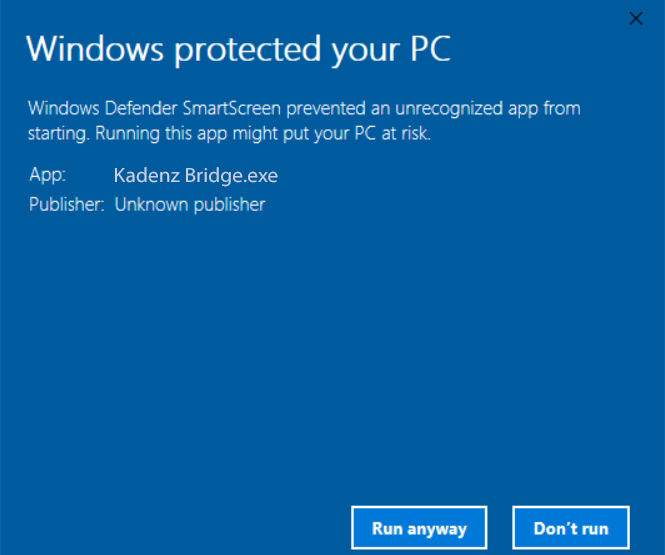
Windows SmartScreen — click Run anyway
Kadenz Bridge is not code-signed yet (certificates are expensive, and if Kadenz gets more users, we'll get a signed build, which still takes time to be trusted by Windows Defender SmartScreen). Windows Defender SmartScreen may block the first launch and show Windows protected your PC with an unknown publisher.
Our App does not access your data or do anything malicious. We're just a small team trying to make a living by selling a product that helps people make music.
If you're still concerned, you can use Kadenz without bridge by pasting the JSON into the Kadenz device in Live.
Right-click the Kadenz icon in the Windows system tray (near the clock). Two settings matter for Open in Ableton:
Program Files/Ableton/…/Program/).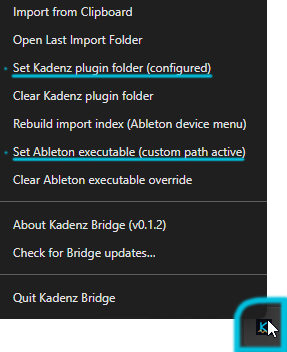
You only need to configure these once per machine. If Handoff stops working after moving the device, update the plugin folder path.
On any blueprint in Kadenz, click Open in Ableton. Bridge saves the full JSON under Documents/Kadenz and may focus Live.
In Live, on the Kadenz device, click Handoff (or wait a few seconds for auto-import after Open in Ableton). Bridge does not talk to the device over the network — it only writes files on disk.
Drop reads the JSON box on the device and builds Session clips on tracks whose names match Kadenz categories (Pad, Bass, Kick, …). Best for small blueprints.
Max truncates very long pasted text (often near ~32k characters). Use JSON file on the device to pick a .json from disk, or use Handoff / Past imports with Bridge.
Bridge keeps recent handoffs. The device can load a previous blueprint from the Past imports list without re-sending from the web app.
Kadenz: there.